The Truth About the Meta Ray Ban Display: Pros, Cons, and Verdict
Introduction
The collaboration between Meta and Ray-Ban has attracted attention beyond the fashion world: what began as an effort to put social features and basic media capture into classic eyewear has evolved toward a bolder promise — glasses that can display information in the wearer’s field of view. The "Meta Ray-Ban Display" positions itself at the intersection of consumer electronics, fashion, and augmented reality (AR). For buyers who care about mobility, hands-free interaction, and staying connected without constantly looking at a pocket-sized screen, these devices hold appeal — but they also force trade-offs.
This article examines the Meta Ray-Ban Display in practical, real-world terms. It covers design and comfort, what the display can actually do for everyday users, battery and performance realities, privacy and software concerns, and how the product stacks up against other wearable options. The goal is to provide an evidence-driven, buyer-focused assessment so readers can decide whether this kind of product is a sensible addition to their tech lineup — especially for those who expect a meaningful bridge between wearable displays and laptop-centric workflows.
Detailed product review and analysis
What the Meta Ray-Ban Display aims to be
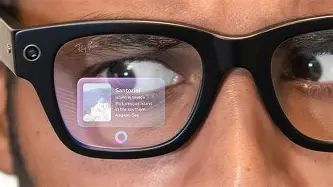
At its core, the Meta Ray-Ban Display blends Ray-Ban’s frame design with Meta’s software and sensor expertise. Rather than an all-encompassing headset, the product aims for subtlety: a wearable that looks like regular sunglasses (or optical frames) while offering heads-up display (HUD) features such as notifications, navigation prompts, glanceable contextual information, basic AR overlays, and media capture or playback. The proposition is to let users access short snippets of information without reaching for a phone or opening a laptop.
Design and comfort
One of the strongest selling points is aesthetic continuity with familiar eyewear. Ray-Ban’s design language makes the device more socially acceptable than bulkier AR headsets. For many buyers, this matters as much as technical capability: people want technology that does not make them stand out for the wrong reasons.
Comfort is a practical constraint. Adding a display, electronics and a battery to a pair of glasses changes weight distribution. Real-world users report that lightweight frames and balanced temple arms make all the difference for all-day wear. Prospective buyers should try on the glasses where possible and consider prescription compatibility: many users will require prescription lenses or inserts, and the ease with which these can be accommodated varies by model.
The display experience: what to expect
Unlike a laptop screen or smartphone display, a glasses-mounted display is constrained by size, field of view (FOV), and ambient lighting. The Meta Ray-Ban Display is designed for short, glanceable content — notification snippets, simple turn-by-turn directions, or small AR annotations — rather than full web browsing or document editing. Expect:
- Limited FOV: comfortable for overlays and short prompts, not for immersive apps.
- Legibility that depends on ambient light: contrast and brightness can make a large difference outdoors versus indoors.
- Interaction models based on taps, gestures, voice, or companion app control rather than complex touch inputs.
For laptop users, the most feasible real-world integrations are notification mirroring and quick-accept/decline interactions for calls and messages. Heavy typing, long-form reading, or spreadsheet work remain laptop tasks; the glasses serve as a secondary, glanceable layer.
Audio and communication features
Many users value bone-conduction or open-ear speakers for keeping awareness of the environment while listening to audio prompts. The Meta Ray-Ban Display typically prioritizes ambient awareness and one-to-one voice interactions (voice assistants, calls) rather than private, high-fidelity music listening. For buyers who expect laptop-grade conferencing audio, the glasses can supplement but not replace dedicated headsets or laptop microphones.
Battery life and daily usage
Battery life is commonly the most limiting factor for wearable displays. Because of size constraints, batteries are typically small; realistic daily use often means intermittent bursts of activity rather than continuous streaming. Users who rely on the glasses for navigation on a long outing or extended AR experiences should carry a power bank or plan for recharges during the day. For casual, short-burst uses (notifications, quick selfies, brief navigation), battery life typically covers a full day.
Software, updates, and ecosystem
Functionality depends heavily on the supporting software: companion apps for phone and laptop pairing, firmware updates, and cloud services for features like transcription or contextual notifications. Meta’s ecosystem ambitions — connecting devices across phones, laptops and cloud services — are a potential strength if updates and integrations roll out consistently. However, buyers should be aware that the pace and durability of feature support can change; longevity and regular security updates should be part of the purchase decision.
Looking for the best Laptops & Computers deals on Amazon?
Shop Amazon →Privacy and data considerations
Wearables that include cameras and always-on sensors raise legitimate concerns. Users should evaluate:
- How raw media and metadata are stored and transmitted
- Whether local processing is used for sensitive tasks (e.g., face recognition)
- Clear visual indicators of recording and camera use
- Options to disable or limit data sharing
Companies that prioritize transparency about data collection, storage and third-party sharing reduce user risk. Buyers who prioritize privacy may also prefer devices that allow offline operation for sensitive functions.
Durability and repairability
Eyewear faces different physical stresses than phones or laptops: they must tolerate bending, temperature changes, and frequent surface contact. The integration of electronics means repairs can be more involved. Check warranty coverage and the availability of authorized repair centers, and consider the replaceability of lenses and temples when evaluating total cost of ownership.
Pros & Cons
- Pros
- Stylish, low-profile design that resembles conventional Ray-Ban eyewear
- Hands-free, glanceable access to notifications and short contextual information
- Useful for on-the-go navigation and quick interactions without pulling out a phone
- Potentially strong ecosystem integration if Meta’s software features are fully supported
- Open-ear audio keeps environmental awareness while enabling voice interactions
- Cons
- Limited field of view and display real estate make it unsuitable for extended productivity tasks
- Battery life constrained by form factor — can be insufficient for heavy use days
- Privacy concerns related to cameras and data collection persist for some users
- Repairability and long-term support can be less transparent than traditional eyewear
- Price vs. utility trade-off: buyers should ensure the features align with real needs
How the Meta Ray-Ban Display compares to alternatives
Not every wearable aims for the same balance of fashion, functionality and immersion. The table below compares high-level attributes so prospective buyers can assess fit based on common priorities.
| Product | Form Factor | Display Focus | Best for | Notable trade-off |
|---|---|---|---|---|
| Meta Ray-Ban Display | Eyewear-looking glasses | Glanceable HUD, notifications, lightweight AR overlays | Daily commuters, outdoor navigation, fashion-conscious users wanting subtle wearable tech | Smaller FOV and limited continuous battery for extended sessions |
| Vuzix Blade (or similar) | Technical-looking smart glasses | AR overlays with more developer focus | Enterprise use, field technicians, developers wanting more AR control | Less fashionable, bulkier design |
| Bose Frames | Sunglass-style frames (audio-first) | No visual display; focus on audio AR and audio playback | Audio-first users who want open-ear listening and ambient awareness | No visual information layer |
Real-world use cases
Understanding how people actually use a wearable display helps ground expectations.
Commuting and navigation
For cycling or walking commuters, glanceable turn-by-turn directions and short alerts reduce the need to stop and check a phone. The Meta Ray-Ban Display is well-suited to quick confirmations: which direction to turn, how far until the next transit transfer, or simple arrival notifications.
Hands-free task assistance
People working with their hands — repair technicians, cooks, or warehouse staff — can benefit from short, contextual overlays: recipe steps, checklists, or quick schematics. In many of these scenarios, the limited FOV is acceptable because the content required is small and focused.
Phone and laptop companion
For users who split time between a laptop and mobile activity, the glasses can mirror critical notifications, provide call controls, and surface quick readouts (calendar reminders, timers). They do not replace a laptop for productivity but can reduce interruptions during focused work.
Casual media and social capture
Short-form media capture (a quick video clip or hands-free selfie) works naturally. However, for longer recordings or professional-quality media, dedicated cameras remain preferable. Social situations may also require discretion; users should observe local norms and legal restrictions around recording.
Looking for the best Laptops & Computers deals on Amazon?
View Offers →Buying guide: What to check before purchase
Potential buyers should evaluate the following practical factors to ensure the device meets real needs rather than marketing promises.
- Try before buying: Fit and comfort are subjective. If possible, try models on to verify weight, temple pressure and balance.
- Display visibility: Test readability in bright outdoor light and dim indoor environments. Contrast and brightness can vary by model.
- Battery expectations: Ask for typical real-world battery numbers for your expected use case (navigation vs. intermittent notifications) rather than manufacturer peak claims.
- Companion app and compatibility: Confirm compatibility with the phones and laptops used daily. Check whether the companion app supports your platform and whether notification mirroring requires specific OS versions.
- Privacy controls: Verify how to disable cameras, mute microphones, and clear stored data. Look for visible recording indicators that alert bystanders.
- Prescription options: If the buyer needs prescription lenses, confirm whether the device supports prescription inserts or whether optional prescription frames are available.
- Warranty and service: Learn what the warranty covers, how long software updates are guaranteed, and where repairs can be performed.
- Use-case fit: Match the device to the primary use case. If the goal is laptop-style productivity, conventional laptops and headsets remain superior. If the goal is glanceable information during physical activity, the glasses may be a compelling fit.
Typical buyer concerns and answers
“Will this replace my phone or laptop?”
No. The Meta Ray-Ban Display is designed to complement rather than replace primary devices. It excels at short, context-aware interactions but is not intended for extended typing, complex content creation, or full-screen media consumption.
“Is it socially acceptable?”
Compared to bulkier headsets, a Ray-Ban style frame is more likely to be accepted in everyday social environments. However, cameras embedded in glasses can still raise eyebrows; users should be mindful of local norms and privacy expectations.
“How long will it be supported?”
Longevity depends on the manufacturer’s commitment to firmware and feature updates. Buyers should check the company’s published update policy and community feedback regarding past devices to estimate likely support duration.
Conclusion: verdict for prospective buyers
The Meta Ray-Ban Display represents a pragmatic approach to consumer AR: prioritizing style, subtlety and glanceable utility over immersive experiences. For buyers who value hands-free navigation, discrete notification access, and a wearable that blends into daily life, it can be a sensible choice — provided they accept current technical constraints such as limited field of view and battery life.
Those whose primary needs are laptop-class productivity, professional media capture, or privacy-sensitive environments should carefully evaluate alternatives. Enterprise-grade AR devices or dedicated audio wearables may offer better performance for narrow, specialized tasks.
In short, the Meta Ray-Ban Display is best thought of as a convenience-first accessory rather than a platform-shifting device. It offers meaningful value for particular real-world use cases — commuting, hands-free task assistance, and quick interactions — while asking users to accept trade-offs common to the form factor. Buyers will get the most value by aligning expectations with actual use patterns: if glanceable information and subtle style matter most, the glasses earn a strong recommendation; if full-screen productivity and long-running AR sessions are priorities, a different solution will be more appropriate.