Don't Buy the Rival 3 Wireless Until You Read This Full Analysis
The gaming peripheral market is currently saturated with options that promise professional-grade performance at ever-decreasing price points. Within this competitive landscape, the SteelSeries Rival 3 Wireless has emerged as a particularly interesting candidate for those looking to cut the cord without draining their bank account. However, picking a gaming mouse based on price alone often leads to long-term frustration. Wireless technology, battery management, and sensor accuracy are complex variables that can make or break the experience for a competitive or even a casual gamer.
This analysis dives deep into the engineering, ergonomics, and real-world utility of the Rival 3 Wireless. While it occupies a "budget" slot in the SteelSeries lineup, it shares DNA with much more expensive flagship models. But shared DNA does not always equal equivalent performance. There are specific design trade-offs made in this model—particularly regarding weight and power source—that potential buyers must understand before committing. This is not just a list of specifications, but an editorial breakdown of how this device actually feels on a desk after hours of high-stakes gameplay and productivity tasks.
The Core Technology: Quantum 2.0 Dual Wireless
Perhaps the most significant selling point of the Rival 3 Wireless is the introduction of Quantum 2.0 Dual Wireless technology. Historically, budget wireless mice were forced to choose between a dedicated 2.4GHz connection or Bluetooth. The Rival 3 Wireless offers both, which fundamentally changes its value proposition. For gaming, the 2.4GHz connection provides a 1ms response time, effectively eliminating the perceptible lag that once plagued wireless peripherals. For productivity or travel, the Bluetooth 5.0 connection allows users to connect to laptops, tablets, or even smart TVs without needing to occupy a USB port with a dongle.
The 2.4GHz connection uses an optimized frequency-hopping system. In environments like college dorms or offices where dozens of wireless signals are competing for bandwidth, this technology is designed to automatically switch to clean channels to prevent packet loss. During testing in high-interference zones, the connection remains remarkably stable, which is a testament to the engineering SteelSeries has migrated down from their Aerox and Prime lines. However, the reliance on a small USB dongle means that losing this tiny component can be a headache, though SteelSeries does provide a storage slot inside the mouse chassis.
Sensor Performance: The TrueMove Air
At the center of any gaming mouse is the sensor. The Rival 3 Wireless utilizes the TrueMove Air, a custom optical sensor developed in collaboration with PixArt. It boasts a sensitivity range up to 18,000 CPI (Counts Per Inch), 400 IPS (Inches Per Second) tracking, and 40G acceleration. On paper, these numbers are impressive and far exceed what the average human can actually utilize in a flick-shot scenario. However, the real utility of the TrueMove Air lies in its power efficiency and tilt-tracking capabilities.
In real-world use cases, tilt tracking is essential for gamers who "reset" their mouse frequently. When you lift the mouse to reposition it on the pad and set it down at a slight angle, a poor sensor might register a "phantom" movement, sending your crosshair toward the floor or sky. The TrueMove Air is specifically tuned to ignore these unintentional inputs. Furthermore, it is designed to operate on very low power, which is critical because, unlike many modern gaming mice with internal lithium-ion batteries, the Rival 3 Wireless is powered by AAA batteries.
Design, Ergonomics, and Build Quality
The Rival 3 Wireless follows a classic, right-handed ergonomic shape that has been a staple of the SteelSeries catalog for years. It features a slightly flared back and a mid-hump that caters well to claw and fingertip grip styles. Users with very large hands might find a palm grip slightly cramped, but for medium-to-small hands, the contour is incredibly natural. The surface is finished in a high-grade matte polymer, which offers a decent amount of grip even when hands become sweaty during intense sessions, though it does tend to show oil marks over time.
Build quality is one area where SteelSeries rarely compromises. Despite its plastic construction, the mouse feels solid. There is no audible creaking when applying pressure to the sides, and the primary buttons use 60-million-click mechanical switches. These switches provide a very tactile, "clicky" feedback that feels deliberate. Unlike cheaper office mice that can feel "mushy," the Rival 3 Wireless offers a crisp actuation that is essential for games like League of Legends or Counter-Strike where timing is everything.
The Weight Dilemma
If there is a controversial aspect of the Rival 3 Wireless design, it is the weight. In the current era of "ultra-light" mice where brands are pushing toward 50 or 60 grams, the Rival 3 Wireless is a bit of a heavyweight. With two AAA batteries installed, the mouse weighs approximately 106 grams. While this provides a sense of stability and "heft" that some players prefer for tracking-heavy games, it can lead to fatigue for those used to lighter shells.
Find top-rated Electronics products at great prices.
Shop Amazon →Interestingly, SteelSeries designed the mouse to be functional with only one AAA battery. By removing one battery, users can drop the weight to about 95 grams. This shifts the center of gravity slightly, but it offers a customization option rarely seen in this price bracket. You sacrifice half of your battery life for a more nimble feel, a trade-off that many competitive players are willing to make.
Battery Life and Longevity
SteelSeries claims the Rival 3 Wireless can last over 400 hours on a single pair of batteries. It is important to read the fine print here: this maximum figure is generally achieved using "High-Efficiency Mode." In this mode, the polling rate is reduced, and the RGB lighting is turned off. When running in full "Gaming Mode" at a 1000Hz polling rate with the scroll wheel lighting active, that duration will drop significantly. However, even at peak performance, you can expect several weeks of heavy usage before needing to swap cells.
The lack of a rechargeable internal battery is a polarizing choice. On one hand, you never have to plug the mouse in; you just swap batteries and you are back at 100% in seconds. On the other hand, it creates a recurring cost and environmental waste, unless you invest in high-quality rechargeable NiMH batteries like Eneloops. For travelers who don't want to carry another charging cable, the AAA system is a blessing. For the eco-conscious desk gamer, it might be a deterrent.
Feature Comparison: Rival 3 Wireless vs. Competitors
To understand where the Rival 3 Wireless sits in the market, we must compare it to its primary rivals—the Logitech G305 and the Razer Orochi V2. These three mice represent the "holy trinity" of budget-to-midrange wireless gaming.
| Feature | SteelSeries Rival 3 Wireless | Logitech G305 Lightspeed | Razer Orochi V2 |
|---|---|---|---|
| Connection | 2.4GHz & Bluetooth 5.0 | 2.4GHz Only | 2.4GHz & Bluetooth |
| Sensor | TrueMove Air (18K CPI) | HERO (12K DPI) | 5G Advanced (18K DPI) |
| Weight (Min) | ~95g (1x AAA) | ~99g (1x AA) | ~60g (No Bat) |
| Battery Type | 1 or 2 x AAA | 1 x AA | 1 x AA OR 1 x AAA |
| Switches | 60M Mechanical | 10M Mechanical | 60M Mechanical (Gen-2) |
| Customization | SteelSeries Engine | Logitech G Hub | Razer Synapse |
Pros and Cons Analysis
Every product has its strengths and weaknesses. The Rival 3 Wireless is a master of versatility, but it misses the mark for specific niches of the gaming community. Here is a breakdown of what to love and what to reconsider.
Pros
- Dual Wireless Connectivity: Being able to switch from a gaming PC to a work laptop with a flick of a bottom-mounted switch is incredibly convenient for modern hybrid lifestyles.
- Premium Switch Feel: The mechanical switches used here feel superior to many mice that cost twice as much, offering a satisfying and reliable click.
- On-Board Memory: You can save your CPI settings and polling rates directly to the mouse, meaning your preferences travel with you without needing to install SteelSeries Engine on every machine.
- Durability: The polymer construction is rugged and built to withstand the rigors of travel and frequent use.
- Price-to-Performance Ratio: Accessing a 1ms wireless lag-free experience at this price point makes high-level gaming accessible to a wider audience.
Cons
- Weight: Even in its lighter 1-battery configuration, it is heavier than many competitors, which may be a deal-breaker for low-sensitivity FPS players.
- Battery Recurrence: The requirement for AAA batteries means you must always keep spares on hand or invest in rechargeables.
- RGB Limitations: Only the scroll wheel features lighting. While this helps battery life, those who want a desk full of glowing "gamer" aesthetics may find it underwhelming.
- Small Dongle: While there is a storage slot, the 2.4GHz dongle is very small and easy to lose if you are not diligent when switching devices.
Buying Guide: Is It Right for You?
Choosing the Rival 3 Wireless depends heavily on your specific use case. It is not a "one size fits all" tool. Below are several scenarios where this mouse either shines or falls short.
The Student or Hybrid Worker
If you are someone who carries a laptop to classes or a coffee shop but also plays Valorant or League of Legends in your room at night, this is arguably the best mouse on the market for you. The Bluetooth functionality allows you to use it on the go without a danging dongle, while the 2.4GHz mode gives you the performance you need for gaming. Its "stealthy" design—thanks to the minimal RGB—means it doesn't look out of place in a professional or academic setting.
The Competitive FPS Player
For those whose primary focus is games like Counter-Strike, Apex Legends, or Overwatch, the Rival 3 Wireless is a tougher sell. In these titles, low weight and low friction are king. While the sensor is excellent, the 100+ gram weight makes rapid flicking and lifting more taxing on the wrist. If you are a "high-DPI" player who moves the mouse only small distances, the weight matters less, but for "low-DPI" arm-aimers, you might prefer a lighter alternative.
Looking for the best Electronics deals on Amazon?
Browse Now →The Value Seeker
If you are upgrading from a generic office mouse or a budget wired mouse, the Rival 3 Wireless will feel like a revelation. The freedom of wireless without the high cost of flagship models is its strongest draw. It is a reliable, high-performance "workhorse" that will likely last for several years of daily abuse.
Real-World Use Cases and User Experience
In practice, using the Rival 3 Wireless reveals nuances that spec sheets miss. One such nuance is the SteelSeries Engine software. Unlike some peripheral software that feels bloated or invasive, SteelSeries GG (the current hub for the Engine) is relatively streamlined. It allows for fine-tuning the CPI in increments of 100, remapping all six buttons, and setting the sleep timer. The sleep timer is particularly important; you can set the mouse to go into a deep sleep after as little as one minute of inactivity to preserve that precious AAA battery life.
Another real-world consideration is the "feet" or skates of the mouse. The Rival 3 Wireless uses high-quality PTFE (Teflon) glides. Out of the box, the glide is smooth on both cloth and hard pads. However, because the mouse is heavier, it exerts more pressure on these skates, which might cause them to wear down faster than on a 60g mouse. It is worth noting that third-party replacement skates are widely available should you find the glide becoming scratchy after a year of use.
Regarding the dual-battery vs. single-battery usage: most users will find that the weight savings of using a single AAA battery outweigh the inconvenience of more frequent changes. The balance shift is minor; the mouse becomes slightly "tail-heavy," but it is easily compensated for within a few hours of play. This flexibility is a unique "pro" that shouldn't be overlooked by those who are on the fence about the weight.
Conclusion
The SteelSeries Rival 3 Wireless is a study in calculated compromises. By opting for AAA batteries and a slightly heavier shell, SteelSeries was able to include a top-tier sensor and a sophisticated dual-wireless system at a price that challenges almost everything else in its category. It is a device built for durability and versatility rather than the pursuit of "lightest in class" records.
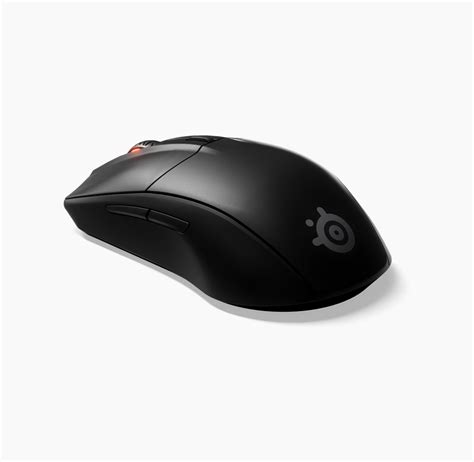
If you value the ability to switch between Bluetooth and 2.4GHz, and if you prefer a mouse that feels substantial in the hand, the Rival 3 Wireless is an exceptional choice. It bridges the gap between a high-end gaming tool and a practical daily driver. However, if you are a purist chasing the ultra-lightweight trend, or if you find the idea of swapping disposable batteries archaic, you might find the compromises too great. Ultimately, it stands as one of the most reliable and feature-rich wireless mice for the budget-conscious gamer, provided you know exactly what you are getting into regarding its weight and power management.