Biggest Gmmk 3 Buying Mistakes (And How to Avoid Them)
The release of the GMMK 3 represents a significant milestone in the evolution of the mechanical keyboard market. Glorious has transitioned from a brand that catered to the "enthusiast-lite" crowd to one that attempts to bridge the gap between mass-market gaming peripherals and high-end group-buy custom keyboards. However, the sheer modularity and variety of the GMMK 3 lineup—spanning from standard wired editions to the highly customizable HE (Hall Effect) models—creates a complex landscape for potential owners. Making a purchase without understanding the technical nuances of polling rates, switch compatibility, and material science can lead to significant buyer’s remorse. This article dissects the common pitfalls encountered when purchasing this flagship peripheral and provides a roadmap for selecting the configuration that best suits specific functional requirements.
Detailed Product Analysis: The Modular Goliath
The GMMK 3 is not a single product but a platform. It is available in three primary sizes: 65%, 75%, and 100%. Within these form factors, Glorious offers two distinct internal architectures: the standard mechanical edition and the HE edition. The standard version utilizes traditional 3-pin or 5-pin mechanical switches, while the HE version leverages Hall Effect sensors and magnetic switches to allow for adjustable actuation points and rapid trigger functionality. Furthermore, the GMMK 3 introduces "Modular Gasket Management," a system that allows users to swap out the internal gasket mounts to alter the typing feel from stiff and responsive to soft and bouncy.
For the average consumer, the most striking feature is the level of aesthetic customization available through the "Boardsmith" configurator. Buyers can choose between plastic or aluminum top and bottom frames, multiple plate materials (including brass, FR4, and polycarbonate), and a vast array of knob finishes. While this empowers the user, it also creates the first major mistake: over-speccing for aesthetics while under-speccing for performance, or vice versa. The GMMK 3 is built on a "hot-swappable everything" philosophy, extending beyond switches to include the secondary sensors and even the decorative elements. This modularity means that every component choice has a ripple effect on the acoustics and the tactile feedback of the board.
Performance-wise, the GMMK 3 HE models target the competitive gaming demographic. With a 0.1mm to 4.0mm adjustable actuation range and an 8,000Hz polling rate in wired mode, it competes directly with top-tier rapid-trigger keyboards. The standard mechanical version, while lacking these magnetic features, offers a more traditional typing experience that focuses on the enthusiast "thock" or "clack" profiles depending on the choice of case materials and sound-dampening foam layers.
Pros and Cons of the GMMK 3 System
- Pros: Unprecedented level of modularity, allowing for thousands of unique aesthetic and functional combinations.
- Pros: Hall Effect technology is exceptionally well-implemented, providing a genuine competitive advantage in fast-paced esports titles.
- Pros: Support for both 3-pin and 5-pin mechanical switches ensures compatibility with nearly every aftermarket switch on the market.
- Pros: The build quality of the aluminum versions provides a premium, "hefty" feel that justifies the higher price point.
- Pros: Enhanced gasket mounting system offers a much more refined typing feel compared to its predecessor, the GMMK Pro.
- Cons: The software interface can be cumbersome when managing complex RGB lighting and custom macro layers.
- Cons: Highly customized builds can reach price points similar to boutique custom keyboards that offer even more specialized acoustic properties.
- Cons: The battery life on wireless models can be slightly underwhelming if the RGB lighting is kept at maximum brightness.
- Cons: Plastic casing options, while durable, do not provide the same premium resonance control as the aluminum counterparts.
Comparison of GMMK 3 Configurations
| Feature | GMMK 3 Standard (Wired) | GMMK 3 HE (Wired) | GMMK 3 HE (Wireless/PRO) |
|---|---|---|---|
| Switch Type | Mechanical (3/5-pin compatible) | Magnetic (Hall Effect) | Magnetic (Hall Effect) |
| Polling Rate | 1,000Hz | Up to 8,000Hz | Up to 8,000Hz (Wired) / 1,000Hz (2.4G) |
| Customization | Moderate (Switches/Keycaps) | High (Software Actuation) | Extreme (Boardsmith Options) |
| Primary Use Case | General Productivity / Casual Gaming | Esports / Hardcore Gaming | Enthusiast Dual-Purpose Setup |
| Case Material | Usually Plastic (Base) / Aluminum (Custom) | Plastic or Aluminum options | Full CNC Aluminum (Standard for Pro) |
The Biggest GMMK 3 Buying Mistakes
1. Overlooking Switch Compatibility with Hall Effect Modules
One of the most frequent errors occurs when buyers select the HE version of the GMMK 3 assuming they can use their favorite aftermarket mechanical switches, such as Cherry MX Browns or NovelKeys Creams. Hall Effect keyboards require magnetic switches. While the GMMK 3 HE allows for incredible performance tuning, it limits your switch choices to compatible magnetic options. If you are a collector of rare mechanical switches, the standard GMMK 3 is the better choice. Buying the HE model and then realizing you cannot use your boutique frankenswitches is a costly oversight.
2. Underestimating the Acoustic Impact of Case Materials
Many buyers prioritize the lower cost of the plastic version without realizing how much the case material dictates the "sound signature" of the keyboard. Plastic cases tend to be lighter and more resonant in a way that some describe as "hollow." The aluminum versions of the GMMK 3 are specifically designed to dampen vibrations and provide a deeper, more solid sound profile. If a user is looking for that specific "premium thock," opting for the plastic model and expecting to fix it later with foam mods is often less effective than simply investing in the aluminum chassis from the start.
3. Ignoring Form Factor Ergonomics
The 65% model is often chosen for its sleek, minimal appearance. However, many users fail to account for how often they rely on the function row (F1-F12) or the dedicated arrow keys. The 75% layout is generally considered the "sweet spot" for most users, providing a compact footprint while retaining essential keys. Buyers who opt for the 65% for aesthetic reasons often find themselves frustrated by the layer-switching required for basic tasks. Conversely, those who buy the 100% full-sized version may find it consumes too much desk space, hindering mouse movement during gaming sessions.
Discover deals on Electronics — updated daily.
View Offers →4. Misunderstanding the Benefits of 8,000Hz Polling
There is a marketing push around 8,000Hz polling rates. While this sounds impressive, the practical benefit is only realized by users with high-refresh-rate monitors (240Hz or higher) and extremely low-latency systems. For the average gamer on a 60Hz or 144Hz screen, the difference between 1,000Hz and 8,000Hz is imperceptible. Furthermore, 8,000Hz polling consumes more CPU resources. Some buyers pay a premium for the 8,000Hz feature without having the supporting hardware to actually utilize the increased data throughput.
5. Neglecting Software Requirements
The GMMK 3 depends heavily on the Glorious Core software for its most advanced features, particularly for the HE models where actuation points must be set. Buyers who use Linux or highly restricted work computers may find themselves unable to access the full functionality of the board. While many settings are saved to onboard memory, initial configuration requires a compatible OS. Failing to verify software compatibility can turn a high-tech tool into a basic, uncustomizable peripheral.
Detailed Buying Guide: How to Choose Your GMMK 3
Step 1: Define Your Primary Use Case
If your primary activity is competitive gaming (Valorant, Counter-Strike, Apex Legends), the HE version is almost a mandatory choice. The ability to set the "Rapid Trigger"—where the key resets the moment you lift your finger—is a transformative experience for movement-heavy games. However, if you are a writer, coder, or general user who prioritizes the feel and sound of a traditional mechanical switch, the standard GMMK 3 offers more variety in the "switch rabbit hole."
Step 2: Selecting the Frame Material
Consider your environment. If you travel with your keyboard or take it to LAN events, the plastic version is significantly lighter and easier to transport. If the keyboard is going to be a permanent fixture on your desk, the aluminum version provides a level of stability and luxury that defines the high-end experience. The aluminum frame also acts as a better heat sink for the RGB LEDs, which can keep components cooler during long sessions of maximum-brightness lighting.
Step 3: Plate Material and Gasket Feel
This is where the GMMK 3 becomes truly enthusiast-grade. If you want a "stiff" typing experience that feels very precise, choose a brass or aluminum plate. If you prefer a "flexy" or "bouncy" feel that is easier on the fingers during long typing sessions, go with polycarbonate or FR4. The GMMK 3 allows you to change these later, but getting it right in the initial build saves time and money. Pair a polycarbonate plate with the "soft" gasket settings for the ultimate comfortable typing experience.
Step 4: Connectivity Needs
The GMMK 3 offers wired and wireless (Bluetooth and 2.4GHz) options. Gamers should almost always use the 2.4GHz dongle for a "wire-free" experience that doesn't sacrifice latency. Bluetooth is excellent for switching between a laptop and a tablet for productivity but is unsuitable for gaming. If you never plan to move your keyboard, the wired-only version is more budget-friendly and eliminates the need to manage battery health over several years.
Step 5: Customizing the Aesthetics
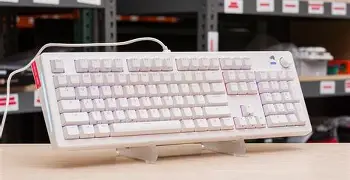
The "Boardsmith" process allows for customization of the top frame, bottom frame, knob, and even the cable. While it is tempting to go for the most vibrant colors, consider the longevity of the design. Neutral colors like "Black Slate" or "White Ice" are easier to pair with different keycap sets in the future. Since the GMMK 3 is modular, you can always buy a new top frame later if you want to refresh the look of your desk setup.
Discover deals on Electronics — updated daily.
View Offers →The Evolution of the Gasket Mount in the GMMK 3
A specific area where buyers often make mistakes is in understanding the new gasket system. In previous generations, the gasket mount was often criticized for being too stiff, rendering the "gasket" label almost moot. With the GMMK 3, Glorious has introduced Modular Gasket Management. This allows the user to choose between different types of gasket materials (such as silicone or poron) and different placement points.
The mistake many make is ignoring this system entirely and sticking with the factory defaults. To get the most out of the GMMK 3, users should experiment with removing or adding gaskets to find their preferred level of "deck flex." A keyboard that is too stiff can cause finger fatigue over several hours of use, while one that is too soft might feel "mushy" to someone used to traditional office keyboards. Real-world testing reveals that the "FR4 Plate + Poron Gasket" combination provides the most balanced experience for the majority of users, offering clear acoustic feedback without being jarringly stiff.
Maintenance and Longevity Considerations
Because the GMMK 3 is so modular, it is inherently more repairable than traditional soldered keyboards. However, a common mistake is improper maintenance of the hot-swap sockets. Repeatedly swapping switches can eventually loosen the socket connections on the PCB. To avoid this, always ensure switch pins are perfectly straight before insertion and support the back of the PCB if the board is disassembled. For the HE models, ensure that no debris or metal shavings enter the Hall Effect sensor areas, as magnetic interference can cause "ghost" keypresses or erratic actuation behavior.
Additionally, the "HE" switches do not have physical contact points, which theoretically gives them a much longer lifespan (often rated at 100 million keystrokes) compared to the 50-80 million keystrokes of traditional mechanical switches. This makes the HE version a better long-term investment for those who do not plan on changing their setup for many years.
Conclusion
The GMMK 3 is a sophisticated peripheral that offers a solution for almost every type of keyboard user, but its complexity is its primary hurdle. The most successful buyers are those who take the time to distinguish between the performance-oriented Hall Effect technology and the typing-oriented traditional mechanical path. By avoiding the temptation to over-spec for features that your current hardware cannot support—like 8,000Hz polling on a low-refresh monitor—and by carefully selecting materials that match your acoustic preferences, you can ensure that the GMMK 3 becomes a long-lasting centerpiece of your computing setup. Whether you prioritize the competitive edge of rapid-trigger magnetic switches or the tactile ritual of boutique mechanical keys, the GMMK 3 provides the framework, provided you navigate the configuration process with a clear understanding of your own needs.