5 Hidden Features of the Nest Audio You Must Know About
Introduction
Smart speakers have become an essential part of modern living, seamlessly blending music enjoyment with daily conveniences through voice assistants. Among the range of options, Google’s Nest Audio stands out for its elegant design, integrated Google Assistant, and affordable price. But beyond the obvious features like superior sound and hands-free controls lies a trove of lesser-known capabilities. This article explores five hidden features of Nest Audio that can enrich the experience for audiophiles, busy households, and smart home enthusiasts alike.
Nest Audio: A Closer Look
Released as the successor to Google Home, Nest Audio strikes a fine balance between form and function. Its compact silhouette conceals a robust speaker and sophisticated sensors, while the soft touch controls and fabric-covered exterior add modern flair to any room.
While most users appreciate its clear vocals and balanced bass for music streaming, Nest Audio’s potential goes far beyond being a simple smart speaker. With a focus on context-specific use cases typically overlooked in standard reviews, let’s uncover the functionalities that can truly set Nest Audio apart for discerning buyers.
Key Specifications
- Dimensions: 175 x 124 x 78 mm
- Weight: 1.2 kg
- Power: 30 W DC adapter (included)
- Voice Assistant: Google Assistant
- Connectivity: Wi-Fi 5, Bluetooth 5.0, Chromecast built-in
- Audio: 75 mm woofer, 19 mm tweeter, 3 far-field microphones
5 Hidden Features of Nest Audio
1. Intercom Functionality (Broadcast and Reply)
Nest Audio’s broadcast feature transforms it into an internal household intercom. While most smart speakers allow broadcasting messages (“Dinner’s ready!”) to every connected device, Nest Audio, when paired in a multi-device setup, enables two-way replies—often overlooked by users.
Use case: Parents can send a “Time for school!” reminder from the living room and receive a direct voice reply from a child’s room, facilitating genuine communication across rooms without shouting or texting. This is especially valuable in larger homes or for users with mobility challenges.
2. Multi-Room Audio Synchronization
Nest Audio unlocks premium multi-room audio without expensive or complex sound systems. Multiple Nest Audio units, or a mix of Google Cast-enabled speakers, can be grouped under the Home app, letting users play music or podcasts throughout the house—perfectly in sync.
Use case: During a family gathering or house cleaning session, users can keep their playlist flowing from the kitchen to the bedroom, adjusting volume on individual speakers or the entire group by voice or app. This provides a highly flexible audio experience, often underutilized by new owners.
Shop the latest Audio & Headphones picks on Amazon.
See Deals →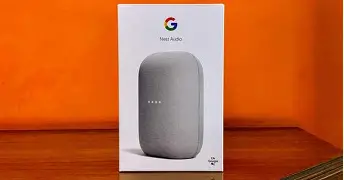
3. Ambient IQ: Adaptive Volume for Context-Aware Listening
Not all smart speakers handle noisy environments gracefully. Nest Audio introduces Ambient IQ, an adaptive volume feature that adjusts responses and alarm volume based on background noise, detected through its microphone array. For example, if the dishwasher is running, Nest Audio automatically raises its answer volume, making sure you never miss a response.
Real-world scenario: Suppose you ask Google Assistant for a weather update while cooking and the exhaust fan is humming. Elevated background noise triggers a louder, clearer response, minimizing interruptions. This intelligent feature is often enabled by default but not widely advertised, making it a true hidden gem.
4. Home Automation Routines with Sound Triggers
Beyond voice commands and schedules, Nest Audio routines can incorporate sound-based triggers to automate daily life. With the correct setup, the device can recognize and act on certain sound patterns—such as clapping or even a smoke alarm beep.
Example: A double-clap could initiate a bedtime routine, dimming smart lights, adjusting the thermostat, and playing sleep music automatically. For households with elderly members or children, sound-based triggers can greatly enhance accessibility and safety.
Note: Some triggers and detection features may require additional configuration via the Google Home app or integration with other Nest/Google devices.
Discover deals on Audio & Headphones — updated daily.
See Deals →5. Voice Match Personalization for Multiple Users
Nest Audio’s Voice Match technology allows up to six users to register their voices, ensuring personalized responses for calendar events, commute times, reminders, or playlists. It can distinguish who’s speaking and provide tailored answers, all with privacy controls in place.
Practical benefit: In busy households, Voice Match enables each member to get their appointments or playlists, rather than sharing a communal schedule. It also secures sensitive information, only responding with personal details when the correct voice is detected.
Pros & Cons
- Pros:
- Impressive audio quality for the price point
- Seamless integration with Google Assistant and smart home ecosystem
- Multi-user personalization with Voice Match
- Flexible multi-room audio and intercom capability
- Adaptive Ambient IQ enhances experience in noisy settings
- Cons:
- No audio out port for wired connections
- Limited third-party service integration compared to some rivals
- Dependent on Google ecosystem for full functionality
- Some automations and triggers require expert setup
Comparison Table: Nest Audio vs. Key Competitors
| Feature | Nest Audio | Amazon Echo (4th Gen) | Apple HomePod Mini |
|---|---|---|---|
| Audio Drivers | 75 mm woofer, 19 mm tweeter | 3 inch woofer, dual tweeters | Full-range driver, passive radiators |
| Voice Assistant | Google Assistant | Amazon Alexa | Siri |
| Multi-Room Support | Yes (Google Cast) | Yes (Alexa Cast) | Yes (AirPlay 2) |
| Personalization | Voice Match (up to 6 users) | Voice Profiles (up to 6 users) | Multi-user voice recognition |
| Audio Out Port | No | 3.5mm Line Out | No |
| Smart Home Integration | Google Home ecosystem | Amazon, Zigbee | Apple HomeKit |
| Price Range (approx.) | $$ | $$ | $$ |
| Hidden Audio Features | Ambient IQ, Intercom reply, Voice Match | Space Adaptation, Home Theatre Pair | Computational Audio, Intercom |
Buyer’s Guide: Choosing and Setting Up Your Nest Audio
Who Should Consider Nest Audio?
- Users invested in the Google ecosystem (YouTube Music, Google Calendar, Chromecast devices, Nest Thermostat, etc.).
- Families or households wanting separate personalization and effective room-to-room communication.
- Those seeking a balance of sound quality, affordability, and minimalist style.
- Anyone interested in automation, adaptive features, or multi-room setups without complicated wiring.
Key Considerations Before Buying
- Wi-Fi Network: A robust, stable Wi-Fi network is essential for uninterrupted audio streaming and Assistant responses. Bluetooth playback is available, but the device’s smart features shine via Wi-Fi.
- Google Home App: Set up and control your device through the Home app, which also provides access to advanced routines, device pairing, and sound settings.
- Device Placement: Proper placement affects both audio fidelity and microphone pickup. Ideally, keep away from corners and heavy obstructions for optimal results.
- Paired Speakers: For true stereo separation, pair two Nest Audio units in the same room via the app—a feature that creates richer, more immersive listening.
- Privacy: Nest Audio features a hardware mute switch, and microphone activity is clearly indicated by LEDs. Review settings to adjust activity logs and control what data is shared.
- Smart Home Integration: If you have other compatible devices (smart bulbs, thermostats, plugs), explore how routines and automations can simplify daily routines.
Useful Setup Tips
- Link music services (Spotify, YouTube Music, Pandora, etc.) within the Google Home app for seamless voice-activated playback.
- Train multiple users in Voice Match for personal responses.
- Create groups for multi-room music, alarms, or intercom features.
- Explore advanced routines, including sound triggers and timed actions.
- Use the app’s equalizer to adjust bass and treble for your preferred audio style.
Conclusion
Nest Audio is much more than a speaker for streaming Spotify or answering trivia questions. Its blend of hardware innovation and software intelligence delivers powerful features that, when fully leveraged, make it a centerpiece for any connected home. From its adaptive audio prowess with Ambient IQ to versatile multi-room and intercom capabilities, Nest Audio quietly excels in areas where more expensive rivals sometimes fall short.
Whether setting up routines for seamless mornings, personalizing responses for each family member, or simply enjoying rich and responsive sound throughout your home, understanding and utilizing these hidden features elevates the Nest Audio from a smart speaker to an indispensable home companion. For individuals and families invested in the Google ecosystem, Nest Audio remains a superb choice—full of surprises that reward the curious and tech-savvy alike.